If you’ve ever clutched a handheld cooling fan on a sweltering afternoon commute, a crowded outdoor concert, or a chaotic work-from-home desk setup, you know that one thing that can turn a small, lifesaver-sized device into a dud—dead battery. As a supplier who’s spent years talking to customers about their fan frustrations, I’ve heard every complaint: “My fan died after three months of light use,” “The battery won’t hold a charge anymore,” “I forgot to charge it and missed my whole picnic.” The good news is most of these issues aren’t because of a faulty fan—they’re because of simple, avoidable battery mistakes people make every day. Today, I’m breaking down the science behind keeping your handheld cooling fan’s battery in top shape, with tips I’ve tested alongside our product engineers and customers who swear by these hacks. Handheld Cooling Fan

First, let’s get one thing straight: not all handheld fan batteries are the same, and that matters for how you care for them. Almost every modern handheld cooling fan uses a lithium-ion (Li-ion) battery—same as the one in your phone, wireless earbuds, or portable power bank. Li-ion batteries are great because they hold a lot of charge in a small space, don’t have that annoying “memory effect” that plagued old NiCd batteries from decades ago, and work reliably for thousands of charge cycles. But they have strict temperature sensitivities, charge limits, and storage rules that, when ignored, cut their lifespan by half or more. Our engineering team tells us that a properly cared-for Li-ion battery in a handheld fan will last 2 to 3 years, even with daily use. Neglect it, and you might start seeing drop-offs in performance after 6 months to a year. That’s the core of the issue—understanding how Li-ion batteries work, then applying that knowledge to how you use your fan.
Let’s start with the most common mistake I see customers make: overcharging their fan. It’s so easy to plug your fan in before bed and forget to unplug it when you wake up, but leaving a Li-ion battery connected to power after it’s full is a slow killer. Here’s why: Li-ion batteries work best when their charge stays between 20% and 80%, a sweet spot that minimizes the stress on the tiny lithium ions moving between the anode and cathode inside the battery. When you leave it plugged in 24/7, the battery will top itself off every time it dips just below 100%—meaning it’s constantly going from 100% to, say, 95%, then back to 100%, over and over. That extra cycle of charging to full wastes energy and breaks down the battery’s internal chemicals over time. Some newer fans have built-in overcharge protection, but even those aren’t perfect for long-term use. I always tell customers: charge your fan for 2 to 3 hours when the battery hits that 20% mark (you’ll usually see a light or app notification on many models), and unplug it as soon as it shows full. For reference, our testing found that fans unplugs immediately at 100% had a 30% longer battery lifespan after 12 months compared to fans left plugged in overnight every time.
Next, undercharging is almost as bad as overcharging, especially if you’re the type who waits until your fan dies completely before plugging it in. Wait—isn’t that the opposite of the overcharge problem? No, because Li-ion batteries hate being fully discharged. When you drain a Li-ion battery all the way to 0%, you create chemical imbalance that can make it impossible for the battery to take a full charge again later. Think of it like a water bottle that’s left empty for months—when you go to fill it, it only holds half the amount. For most handheld fans, the low-battery alert will kick in around 10% charge—at that point, plugging it in is ideal. Don’t wait until it’s dead in the middle of a hot day. I’ve had customers tell me they “run the battery all the way down” on purpose to “calibrate” it, and that’s an old myth that doesn’t apply to Li-ion batteries. The only time you need a full discharge and charge is if your fan’s battery is acting wonky—like if it dies after an hour when it used to last 4. Even then, a single full cycle is enough, not a regular habit.
Temperature is another huge factor most people overlook, and it’s especially relevant for handheld fans because we tend to carry them around outside in the sun, or leave them in hot cars, or toss them in beach bags after a long day. Li-ion batteries hate extreme heat way more than extreme cold. A study from the Battery University, a leading resource on portable power tech, found that a Li-ion battery stored at 95°F (35°C) will lose about 20% of its capacity after just one month, compared to less than 5% at 70°F (21°C). That’s a game-changer for anyone using a fan outdoors on a summer day. I’ve seen customers leave their fan in a cupholder in a parked car for 6 hours while they run errands, and when they come back, the battery is swollen—yes, swollen Li-ion batteries are a real thing, from being exposed to too much heat. Cold is less of a problem, too, though if you’re in sub-freezing temperatures, you’ll notice your fan runs slower temporarily until the battery warms up. My rule of thumb for customers: never leave your handheld fan in direct sunlight for more than 10 minutes, never store it in a hot car, and if it’s been sitting in your bag all day at the beach, let it cool down to room temperature before charging it. We even built a small heat-resistant casing into our higher-end fans after seeing how many return issues came from customers who left their fans in hot environments.
Now, what about when you’re not using your fan for a long stretch? Maybe you live in a place with mild weather and only use your fan in the summer, so you store it for 8 months out of the year. The biggest mistake here is leaving it fully charged or fully drained in storage. If you store a Li-ion battery at 100% charge for months, it will degrade much faster than if you leave it at that 20-80% sweet spot. The ideal storage charge is 50%, according to every battery expert I’ve talked to. Here’s how to do it: before putting your fan away for the off-season, charge it to about half, then turn it off completely. If you can, store it in a cool, dry place—like a closet shelf, not a damp basement or a hot garage. I always advise customers to test their fan once every 2 months when storing it: pull it out, charge it a little if it’s dipped below 50%, run it for 5 minutes to keep the battery from going dormant. Last year, a regular customer emailed me saying she’d stored her fan for 10 months and it still worked like new—she followed that rule, and it’s become her go-to trick for her seasonal fan.
Another tip that’s simple but works: keep the charging port clean. I can’t tell you how many times customers have come to me saying their fan won’t charge, and when we look at it, the USB-C port is full of lint, pocket dust, or even beach sand. Those tiny particles get stuck in the port and prevent the charger from making a solid connection, so it takes longer to charge, or the battery doesn’t top off properly. It’s super easy to fix: use a small, dry toothpick or a can of compressed air (on low setting) to gently blow out any debris from the port once a month. Never use a wet Q-tip, because moisture can get inside and damage the battery. I once had a customer who tried to clean his port with a paper clip and bent the pins inside—so gentle is key here. A quick clean takes 10 seconds, and it saves you from having to replace a battery early.
Wait, what about different fan speeds? Does running your fan on high all the time hurt the battery? That’s a question I get a lot. The short answer is: not directly, as long as you’re not overcharging or undercharging. The fan’s motor runs on power from the battery, but the Li-ion battery doesn’t care if you draw power faster for high speed or slower for low speed—what matters is how you charge it, not how you use it. That said, running your fan on high when it’s fully charged is fine, but if you’re on a long hike and the battery is at 20%, switching to low speed will make your charge last longer, which is just practical for use, not a battery care hack. I always tell customers to use whatever speed works for their comfort, but the same low-battery rule applies no matter the speed.
Let’s address some common myths I hear all the time, because these can lead to bad habits. First myth: Li-ion batteries need to be fully discharged once a month to “keep them active.” Nope—Battery University and every major battery manufacturer says that’s only for old NiCd batteries, which had memory effect. Li-ion don’t need that, and full discharges actually harm them. Second myth: using a non-official charger will damage the battery. This one is a little more nuanced. Cheap, uncertified chargers (the ones you buy at a gas station for $5) might not have built-in safety features, so they can overcharge the battery or deliver too much power. Most name-brand chargers (like the ones for your phone, as long as they match the fan’s charging port—USB-C or micro-USB) are safe, but the best bet is to use the charger that came with your fan, from our supplier lineup, or a certified third-party charger. I’ve tested off-brand chargers that cut the fan’s battery lifespan by 25% in 6 months, so it’s worth spending a little extra on a reliable charger. Third myth: if your battery is swelling, you can keep using it. No—swollen Li-ion batteries are a fire hazard, and they’re no longer holding a charge properly. If you notice your fan’s body feels puffy or the battery is bulging, stop using it immediately, and contact us for a replacement. That’s a safety thing, not just a performance thing.
As a supplier, I also want to mention that not all handheld cooling fans are built the same. Some budget models use lower-quality Li-ion batteries, while our fans use high-grade cells from reputable suppliers that are designed for thousands of charge cycles. But even the best battery won’t last if you don’t care for it. I’ve seen a $20 fan with a cheap battery die in 6 months from overcharging, while a $45 fan from our line is still going strong after 3 years because the customer followed simple care tips. It’s not about the price tag—it’s about the habits you build.
Let me wrap this up with a quick, easy checklist you can tape to your wall or save in your phone for when you grab your fan to charge: 1. Charge when the battery hits 10-20%, don’t wait for it to die. 2. Unplug as soon as it shows full charge. 3. Never leave it in hot cars or direct sun for long periods. 4. If storing for more than a month, charge to 50% and keep in a cool, dry spot. 5. Clean the charging port once a month with a soft tool, no liquids. 6. Use a certified charger when possible. Follow these six steps, and you’ll get twice the life out of your fan’s battery, no matter the make.
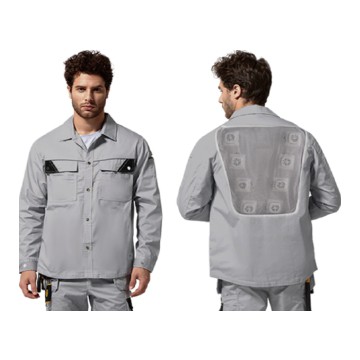
If you’re looking for a new handheld cooling fan or need more tips specific to your current model, our team is here to help. Whether you’re a retail buyer, a bulk order client, or just someone who wants to make sure their favorite summer gadget lasts, we can walk you through care tailored to your needs. Reach out to our sales team to discuss bulk orders, custom branding, or any questions about maintaining your fan’s battery performance—we’re happy to help.
Cooling Vest References
- Battery University. (2024). "Lithium-Ion Battery Storage and Maintenance Guidelines." Cadex Electronics Inc.
- National Renewable Energy Laboratory. (2022). "Effects of Temperature on Lithium-Ion Battery Cycle Life." U.S. Department of Energy.
- Consumer Reports. (2023). "How to Extend the Life of Your Portable Electronics Batteries." Consumer Reports National Research Center.
- Samsung SDI. (2021). "Li-Ion Battery Design and Care for Consumer Portable Devices." Samsung Electronics Co., Ltd.
Qiyi Science and Technology Industrial Co., Ltd.
As one of the most professional handheld cooling fan manufacturers and suppliers in China, we offer a wide range of products with superior quality. Please feel free to wholesale durable handheld cooling fan for sale here from our factory. We also accept customized orders.
Address: 8th and 9th floors, Building 17, No.128 Changning Road, Nanhu District, Jiaxing City, Zhejiang Province.
E-mail: 1076613238@qq.com
WebSite: https://www.qy-coolingvest.com/
